
Generate production-ready source code from state diagrams or sysmlv2 textual models#
From design to code with ease#
Sinelabore is a tool that has proven itself over many years across numerous applications and with many customers. It enables developers to combine event-driven architecture, hierarchical state machines, model-based design, and automatic code generation effectively. You usually see a return on investment very quickly.
Many systems are good candidates for a finite-state-machine implementation: anything that must sequence actions, or react to inputs differently depending on its current mode. Typical examples include control-oriented software such as protocol stacks, stateful workflows, visualizations, and control applications.
Generate C/C++ code from state chart models#
Sinelabore’s focus is generating readable, maintainable code from flat or hierarchical UML state machine diagrams. With its distinctive features, the tool fits the needs of embedded real-time and low-power developers working in C or C++ (and other supported languages).
Unlike framework-centric approaches, SinelaboreRT does not lock you into a specific runtime framework. The generated code fits naturally into both bare-metal and RTOS-based architectures.
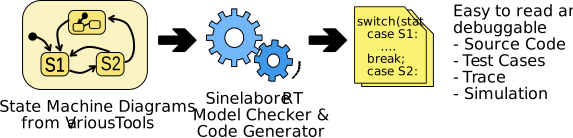
- By generating code that can be compiled with virtually any compiler, and the ability to integrate with your existing IDE, build process or continuous integration system, the code generator can be quickly integrated into any project. Configuration is stored in a plain text file, which lets you tailor the generated output to your needs.
- Generated code has production-quality. It is based on nested switch/case and if/then/else statements. It is easy to read, understand and debug if needed. The generated code requires no compiler specific tricks except standard language features. This means that if the worst comes to the worst, you can easily change or expand the code by hand.
- Can be used with any 8-, 16- or 32-bit CPUs.
- There is no run-time environment needed like with some other solutions.
- Fits well in different system designs. The code generator does not dictate how you design your system. Therefore it is no problem to use the generated code in the context of a real-time operating system (VxWorks, FreeRTOS, embOS, RTEMS, …) or within an interrupt service routine or in a foreground / background (super loop) system.
- There will be no problems when using static code analyzers. Generated C++ code passes clang-tidy and is C++11 ready (
modernize-*). Set configuration parameters accordingly.
What next#
-
Start by choosing a modeling tool. For your first steps, ⬇️ download the integrated editor and the code generator, then follow the editor tutorials. For larger projects and model-based workflows (from use cases to architecture and detailed design), a full modeling tool is recommended, for example Enterprise Architect or UModel. You can find more options on the supported tools overview. A good tool in between is the Cadifra UML editor.
-
Use a ready-made project available for different modeling tools and programming languages from our GitHub page. Make sure you have a recent Java Runtime Environment (17 or newer), compiler, and make tool. Download the codegen and unpack the zip file. Then build the example by calling
make(don’t forget to export correct path variableCODEGEN_PATHto reflect your codegen installation folder.
Example:export CODEGEN_PATH=/home/myusername/develop/sinelaboreRT7.1/bin/ -
Run the example and play with it. Inspect the generated API files first.
Start with the event definitions (*_ext.h) and the state handler interface, understand how those calls map into application code. The handler signature and many aspects of the generated code can be adjusted with the help of a configuration file. -
Create your own example. Start with something small. Identify the events and states of your model. Integrate the state machine into your main loop or scheduler. Feed events into the machine, call the generated handler in a run-to-completion style, and avoid blocking actions (see examples using RTOS or a foreground/background architecture).
-
Enable debug output or trace code early and validate transitions with known event sequences. Verify entry/exit order, self-transitions, and history behavior before scaling the model.
-
Grow the model incrementally. Add one feature at a time (choices, junctions, regions), regenerate, and re-test to avoid hard-to-debug regressions.
Generate code for many backend languages#
For IoT applications where parts of the application are implemented in Java / Python / C# / Lua / Rust / JavaScript / Go or Swift, the code can also be generated in these languages besides C or C++.
This makes it easy to prototype quickly on desktop or cloud backends and then move proven behavior to edge devices without redesigning your logic. Instead of re-implementing state handling by hand for each platform, you model once and keep behavior consistent across gateways, services and firmware. If you are building event-driven IoT systems with frequent feature updates, Sinelabore helps you ship faster while reducing transition and timing bugs.
Pick one backend, generate a small model, compile, and run—you will see the same state logic in code within a short iteration.
Generate C++ code from SysML V2 textual models#
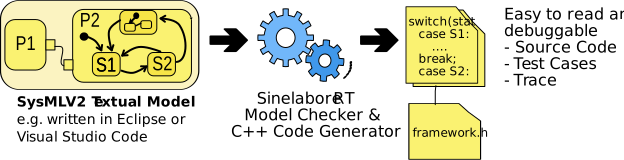
Sinelabore can generate executable C++ code from a SysML v2 textual model. This enables flexible validation and testing of system behavior. In addition to structural elements such as parts and attributes, you can model and test interactions and state machines—so you can describe a complete system compactly and simulate it with generated C++ code.
SysML V2 is a more flexible, powerful revision of SysML. A major advantage is textual modeling, which lowers the barrier to model-based systems engineering (MBSE) where usually expesive and advanced software tools are required: you can author models without a heavyweight GUI toolchain—for example with a Visual Studio Code plugin. Compared with earlier Sinelabore workflows that centred on state machines, the SysML V2 path also emits structural glue code, not only state-machine handlers.
That means you get code for parts and their interactions, which is ideal for mock-ups and executable simulations of a target system early in design.
What next#
-
Start by installing a SysML V2 aware editor e.g. Visual Studio Code with Syside Editor plugin. Download the codegen and unpack the zip file.
-
Use the traffic light project available from our GitHub page. Make sure you have a recent Java Runtime Environment (17 or newer), compiler, and make tool. Then build the example by calling
make(don’t forget to export correct path variableCODEGEN_PATHto reflect your codegen installation folder.
Example:export CODEGEN_PATH=/home/myusername/develop/sinelaboreRT7.1/bin/ -
Modify the sysml code or create your own example. Start with something small. Identify the elements like parts, ports, events and states of your model. Integrate the state machine. Then use a small C++ main function to run the generated system code.
-
Grow the model incrementally.
Add one feature at a time (choices, junctions, regions), regenerate, and re-test to avoid hard-to-debug regressions.
Try it: use the download demo or the integrated editor tutorials and run a ready-made example available on GitHub end-to-end in minutes.
Customers and what customers say#
Sinelabore Code Generator is used worldwide by companies of all sizes, from well-known multinational organizations to smaller independent companies and consultants. The code generator is also used in a wide range of industries.
“Sinelabore has helped me implement the behavior of a complex, asynchronous system. All the UML 2 elements I needed are available. I like that I don’t have to draw the state machine, then separately implement it and keep these two synchronized; this saves me time and reduces the potential of bugs. The error checking to make sure the state machine is valid is also useful.
Daniel Bedrenko / Software Developer @ BPS…tec GmbH”
“Thank you again for providing such great tool!”
“… wir nutzen Ihr Produkt schon seit vielen Jahren und es hat sich als zuverlässiges und wertvolles Werkzeug erwiesen …”
“We like Your Tool, infact we will give intro for another local company next week.”
Study done by “Laboratory of Model Driven Engineering for Embedded Systems @ CEA in France” with the title “Complete Code Generation from UML State Machine” write in their report " … without optimization, Sinelabore generates the smallest executable size ,,,".